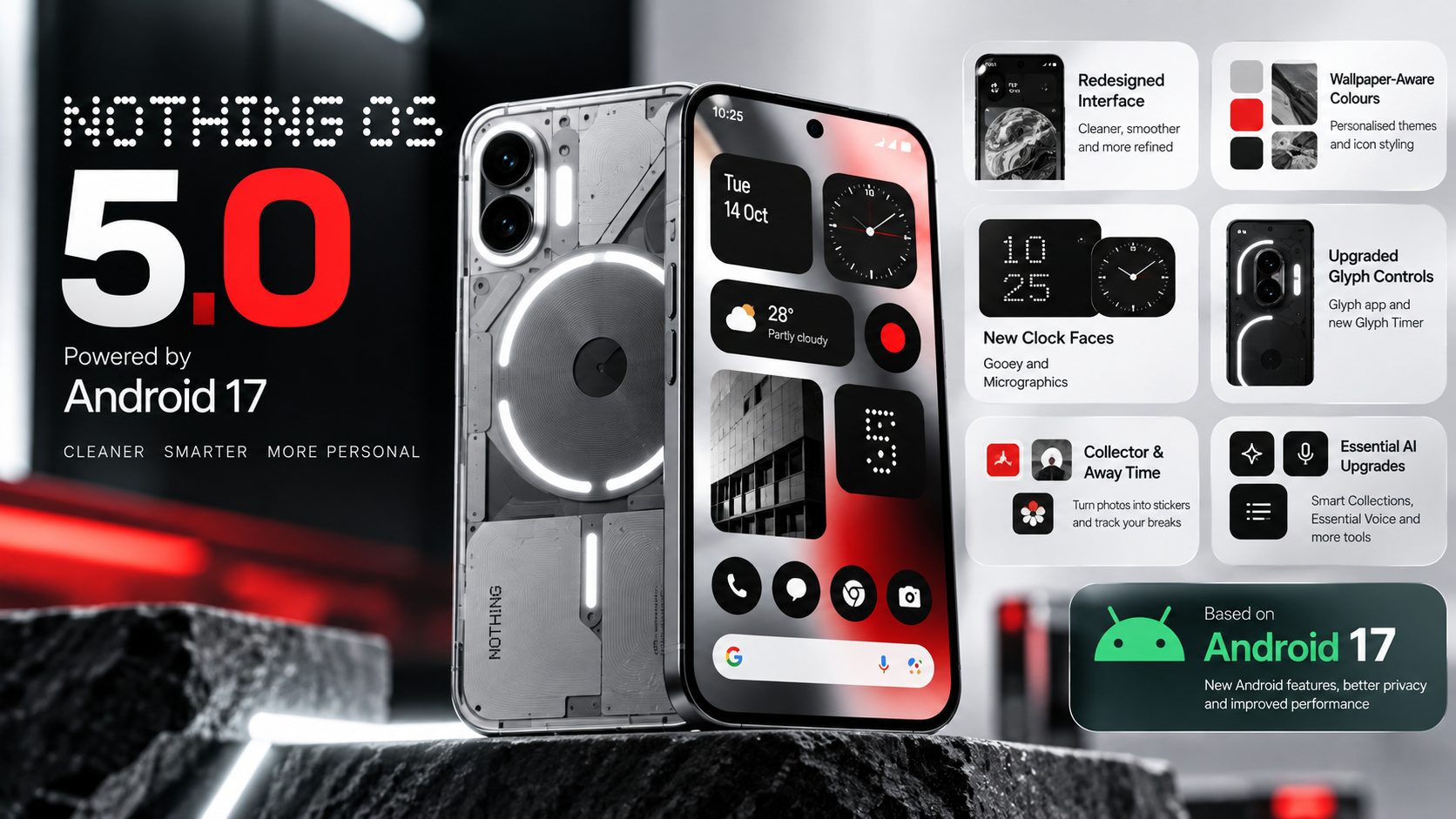
Nothing OS 5.0 is the latest major software update from Nothing, bringing a redesigned interface, additional personalisation tools, improved productivity features and Android 17 enhancements to compatible smartphones.
Nothing announced on 12 October 2026 that the general release had started rolling out to the Nothing Phone (3). Other Nothing and CMF devices are listed on the company's rollout roadmap for subsequent releases. However, the schedule is indicative, and users may receive the update at different times depending on their device and region.
This guide covers the major Nothing OS 5.0 features, the phones listed as eligible, the expected rollout schedule and how to check for the update safely.
Nothing OS 5.0 Release Date
Nothing OS 5.0 is based on Android 17. The company began its general release for the Nothing Phone (3) on 12 October 2026, following the earlier open-beta programme.
Nothing plans to extend the update to additional Nothing and CMF smartphones in stages. The published timeline gives estimated release windows rather than guaranteed dates for every device or country.
Users can follow the official Nothing OS 5.0 page for the latest rollout information.
Nothing OS 5.0: What's New?
1. Refreshed Home Screen and Interface
Nothing OS 5.0 updates the visual design across several everyday parts of the phone, including the home screen, Settings, Camera, Gallery, status bar and system controls.
The update introduces a new Geist typeface, refined icons, adjusted spacing and smoother motion. These changes aim to create a more consistent experience throughout the operating system.
2. Wallpaper-Aware Colours and More Personalisation
The refreshed home screen offers wallpaper-aware colour options, tinted app icons and transparent widgets. Users can customise the appearance of their phone while retaining Nothing's distinctive design approach.
New clock-face options include Gooey, which uses a more expressive style, and Micrographics, which presents information in a compact, hardware-inspired layout. Feature availability can depend on the installed build.
3. New Glyph Controls
Nothing OS 5.0 brings Glyph controls together in a dedicated Glyph app. The update also introduces a Glyph Timer that lets users start countdowns directly from the home screen.
The exact experience depends on the phone's hardware. Users should not assume that every Glyph feature is available on every Nothing device.
4. Collector and Away Time Widgets
Collector lets users turn selected photos into stickers and organise favourite people, places and things on the home screen.
Away Time tracks periods when the phone is put down, helping users review their breaks from screen use. These features add new ways to personalise the home screen and understand phone habits.
5. Improved Essential AI Tools
Nothing has also expanded its Essential AI tools. Smart Collections in Essential Space can group related captures, while improvements to search and the capture experience make stored information easier to organise.
Essential Voice adds real-time text while speaking and improved formatting for notes and summaries. Nothing also describes an Essential Apps feature that lets users create simple tools by describing what they need in natural language.
Some Essential Space improvements are delivered separately through Google Play, and access to certain tools may be gradual or limited. Not every feature should be expected immediately after installing the system update.
6. Performance and Multitasking Improvements
Nothing says the update improves app launches, scrolling, touch response and multitasking. Memory-management changes are intended to reduce unnecessary app reloads.
Actual performance and battery life can vary according to the device, installed applications, usage and software build. Users should assess their own experience rather than assume identical results across all models.
7. Android 17 Features
Because Nothing OS 5.0 is based on Android 17, it also brings additional Android platform features. These include separate spaces for notifications and Quick Settings, updated privacy indicators and permission controls, and changes to screen recording and the recent-apps interface.
Quick Share can also generate a QR code that allows an iPhone or another device to download shared files through a web link. The receiving device and sharing method determine the exact experience.
Nothing OS 5.0 Eligible Phones
Nothing's published rollout information lists the following Nothing and CMF smartphones for Nothing OS 5.0. Inclusion on this list does not mean that the stable update is already available on every device.
| Phone | Indicative general-release window |
|---|---|
| Nothing Phone (3) | From 12 October 2026 |
| Nothing Phone (4a) Pro | Early November 2026 |
| Nothing Phone (4a) | Early November 2026 |
| Nothing Phone (3a) Pro | Early November 2026 |
| Nothing Phone (3a) | Early November 2026 |
| Nothing Phone (2a) | Mid-November 2026 |
| Nothing Phone (2a) Plus | Mid-November 2026 |
| Nothing Phone (3a) Lite | Late December 2026 |
| Nothing Phone (4b) | Mid-January 2027 |
| CMF Phone 2 Pro | Mid-January 2027 |
Important: These are indicative windows from Nothing's published roadmap and may change. Rollout can be phased by region and carrier. Check the official roadmap before treating a date as final.
Will Nothing Phone (1), Phone (2) and CMF Phone 1 Get the Update?
According to Nothing's published software-support information, the original Nothing Phone (1), Nothing Phone (2) and CMF Phone 1 have reached the end of major software support and will not receive Nothing OS 5.0.
Owners of these models should check the latest stable software available for their particular device instead of installing unofficial packages that claim to provide the update.
How to Check for Nothing OS 5.0
Follow these steps to check whether the update is available for your phone:
- Connect your phone to a reliable Wi-Fi network.
- Charge the battery sufficiently before installing a major update.
- Open Settings.
- Go to System and select System update.
- Tap the option to check for updates, if displayed.
- If an update is available, read the version information and follow the on-screen instructions.
- Allow the installation to finish without switching off the phone.
If Nothing OS 5.0 does not appear, it may not have reached your device or region yet. A missing update does not automatically mean that the phone is ineligible.
Should You Install Nothing OS 5.0?
If the stable update is available for your phone, review the release notes and back up important information before installation. A major software update can change settings, app behaviour and system interfaces.
After installing, allow the phone time to finish background optimisation. If you notice persistent problems with battery life, connectivity or an essential app, check for follow-up updates and consult Nothing Support.
Users should distinguish the stable general release from an open-beta build. Beta software can contain bugs and may affect stability, battery life or performance. It is not the preferred choice for people who rely on their phone for essential daily tasks.
Official Nothing OS 5.0 Resources
- Nothing OS 5.0 official update page
- Nothing OS 5.0 general-release announcement
- Nothing OS 5.0 feature explanation
- Nothing OS release roadmap
Conclusion
Nothing OS 5.0 brings a substantial visual refresh, new personalisation features, additional Essential AI tools and Android 17 enhancements. The stable rollout began with the Nothing Phone (3), while other supported Nothing and CMF models are scheduled for later releases.
The most important point for users is to check the official roadmap and their device's System update screen. Rollout dates are indicative, and availability may vary. Installing the update through the normal system-update process is the safest option for supported phones.